Add Your First MCP Server
Connect an MCP server to enable new tools for your agents.
Prerequisites
Find an MCP server from:
- MCP.so - Community registry
- GitHub Registry - Official servers
- ModelScope - Chinese servers
- FastMCP - Python framework
Add via JSON Editor
For advanced configuration, switch to JSON view in MCP Manager.
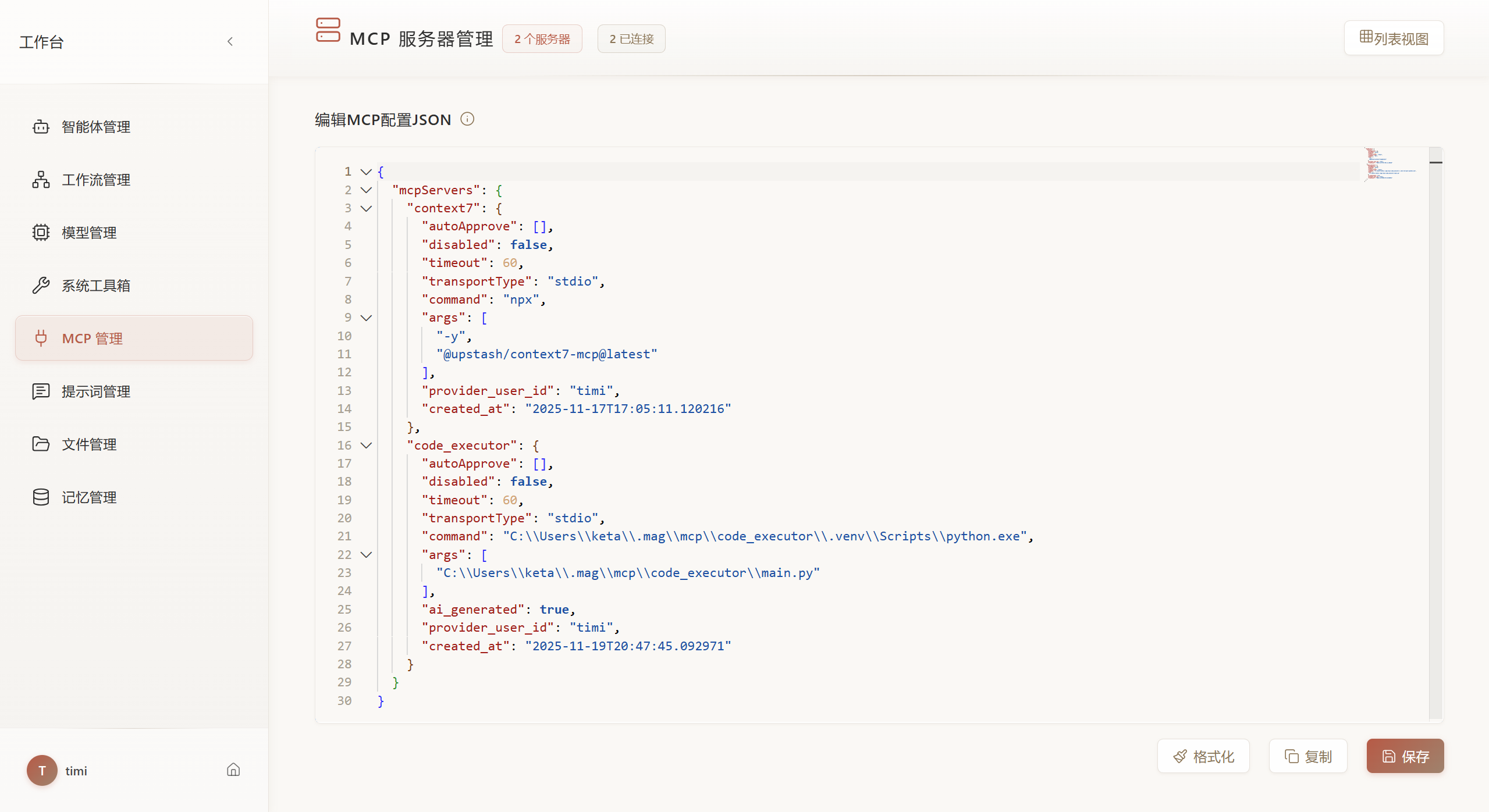
STDIO Example
{
  "mcpServers": {
    "filesystem": {
      "autoApprove": ["read_file", "list_directory"],
      "disabled": false,
      "timeout": 60,
      "transportType": "stdio",
      "command": "npx",
      "args": ["-y", "@modelcontextprotocol/server-filesystem", "/home/user/projects"]
    }
  }
}
SSE Example
{
  "mcpServers": {
    "tavily": {
      "autoApprove": ["search"],
      "disabled": false,
      "timeout": 60,
      "transportType": "sse",
      "url": "https://mcp.api-inference.modelscope.cn/bd902138dc1a4d/sse",
      "env": {
        "TAVILY_API_KEY": "tvly-xxxxx"
      }
    }
  }
}
HTTP Example
{
  "mcpServers": {
    "weather": {
      "autoApprove": [],
      "disabled": false,
      "timeout": 60,
      "transportType": "streamable_http",
      "url": "https://fastmcp.cloud/mcp"
    }
  }
}
Parallel Search (no API key)
Parallel Search MCP
provides web_search for web results and web_fetch for reading URLs. The
anonymous endpoint is free for exploration and light use, with rate limits.
No Parallel API key or local MCP server installation is required. Model inference
is configured and billed separately by your model provider.
In MCP Manager's JSON view, add the parallel_search entry to your existing
mcpServers object, keeping your other servers:
{
  "mcpServers": {
    "parallel_search": {
      "autoApprove": [],
      "disabled": false,
      "timeout": 60,
      "transportType": "streamable_http",
      "url": "https://search.parallel.ai/mcp",
      "headers": {
        "User-Agent": "Agent-Graph/3.0.0"
      }
    }
  }
}
Save, click Connect, and open View Tools. In MCP Inspector,
select web_search and enter Find the official Python asyncio documentation in
objective, and ["Python asyncio official documentation"] in search_queries.
The result includes source URLs and excerpts. To read a source,
select web_fetch and enter ["https://docs.python.org/3/library/asyncio.html"]
in urls.
Leave autoApprove empty to keep tool confirmation enabled. The headers map is
supported for Streaming HTTP connections through the JSON editor; the form does
not expose it.
Add via Form
Navigate to MCP Manager from the workspace sidebar.
STDIO Server
For local Python/Node.js servers:
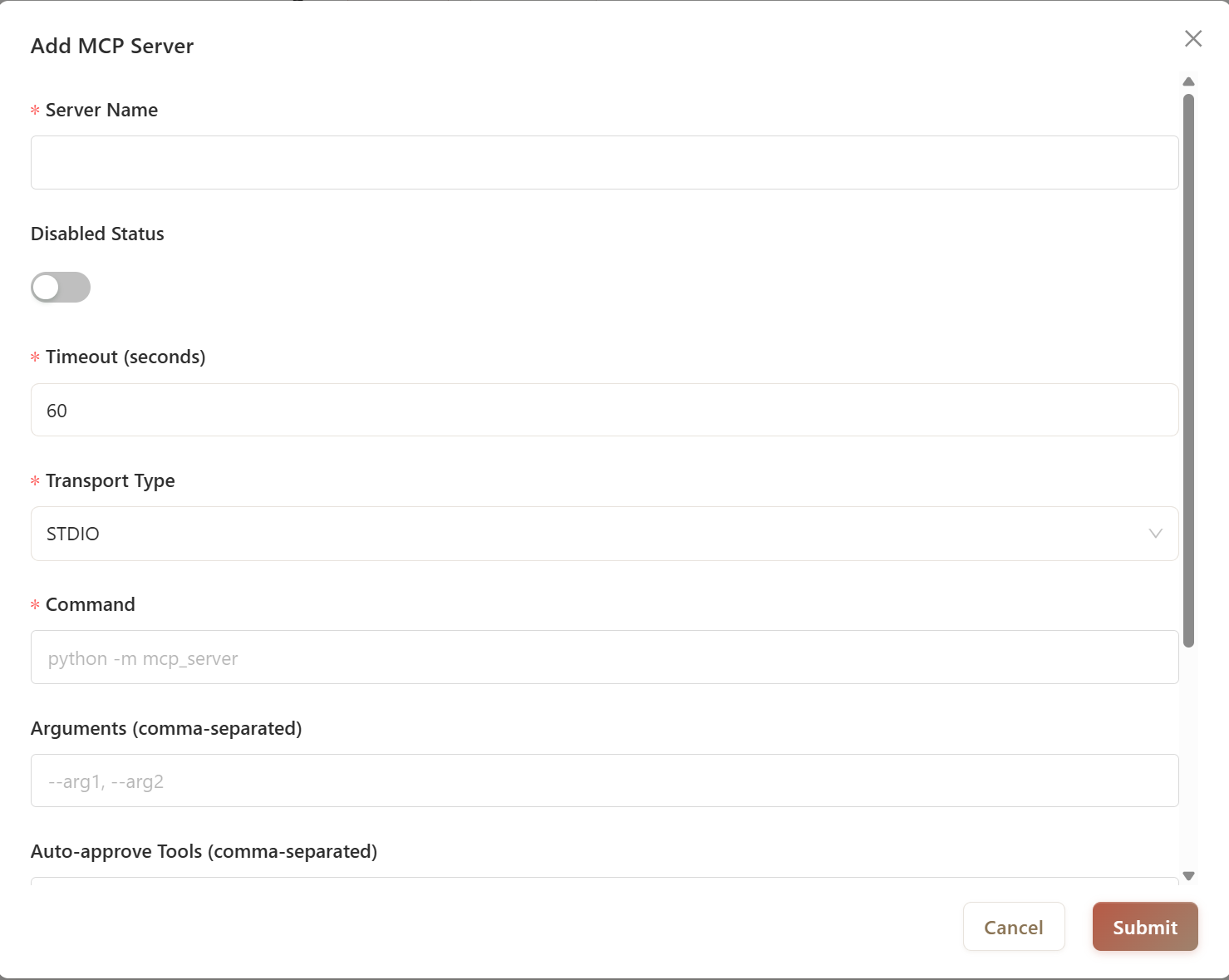
| Field | Description | Example |
|---|---|---|
| Server Name | Unique identifier | filesystem |
| Transport Type | Select STDIO |
- |
| Command | Server executable | npx or python |
| Arguments | Startup parameters (comma-separated) | -y, @modelcontextprotocol/server-filesystem, /path/to/dir |
| Timeout | Connection timeout in seconds | 60 |
| Auto-approve | Tools that skip confirmation (comma-separated) | read_file, list_directory |
| Environment Variables | One per line as KEY=VALUE |
API_KEY=sk-xxx |
Common STDIO Servers:
# Filesystem (Node.js)
Command: npx
Arguments: -y, @modelcontextprotocol/server-filesystem, /home/user/projects

# Git (Node.js)
Command: npx
Arguments: -y, @modelcontextprotocol/server-git, --repository, /path/to/repo

# Tavily Search (Python via uvx)
Command: uvx
Arguments: mcp-server-tavily
Environment: TAVILY_API_KEY=tvly-xxxxx
SSE Server
For HTTP streaming servers:
| Field | Description | Example |
|---|---|---|
| Server Name | Unique identifier | tavily_sse |
| Transport Type | Select SSE |
- |
| SSE Address | Server endpoint URL | https://mcp.api-inference.modelscope.cn/bd902138dc1a4d/sse |
| Timeout | Connection timeout in seconds | 60 |
| Auto-approve | Tools that skip confirmation | search |
| Environment Variables | One per line as KEY=VALUE |
API_KEY=your-key |
Streaming HTTP Server
For FastMCP and compatible servers:
| Field | Description | Example |
|---|---|---|
| Server Name | Unique identifier | weather_http |
| Transport Type | Select Streaming HTTP |
- |
| HTTP Address | Server endpoint URL | https://fastmcp.cloud/mcp |
| Timeout | Connection timeout in seconds | 60 |
Connect and Test
After adding a server:
- Click Connect on the server card
- Check status indicator (green = connected)
- Click View Tools to see available tools
- Use MCP Inspector for detailed testing (see Inspector Guide)
Common Issues
| Problem | Solution |
|---|---|
| Connection timeout | Increase timeout value or check server availability |
| Command not found | Verify command is installed (npx, uvx, python) |
| Environment variables not working | Check syntax: KEY=VALUE with one variable per line |
| Tools not appearing | Disconnect and reconnect; check server logs |
Next Steps
- MCP Inspector - Test tools before using in agents
- Build with Agent - Create custom MCP servers
- Use in Agent - Attach servers to agents